AI Business
How to Create a Month of Social Media Content for $9
The default advice for small businesses struggling with social media is to post more, invest in a content subscription, or hire someone. None of those solutions addresses the actual problem. The actual problem is the absence of a repeatable system that produces content that looks intentional, on-brand, and visually consistent without requiring a camera, a studio, or a production budget.
Why Most Small Businesses Are Solving the Wrong Problem
The default advice for small businesses struggling with social media is to post more, invest in a content subscription, or hire someone. None of those solutions addresses the actual problem. The actual problem is the absence of a repeatable system that produces content that looks intentional, on-brand, and visually consistent without requiring a camera, a studio, or a production budget.
What the Content Gap Really Is
Most small business owners are not failing at social media because they lack creativity or effort. They are failing because they are producing content reactively, reaching for their phone when they remember they should post something, rather than working from a deliberate visual strategy. The result is content that looks inconsistent, generic, and disconnected from the quality of the actual business it is meant to represent. The gap between how good a small business is and how good its content looks is one of the most common and most fixable problems in marketing today. AI closes that gap without a team, without a budget, and without technical skills.
Why This System Works at Nine Dollars
The cost is low because the most expensive part of the content creation process, generating the images, is now free across multiple platforms. ChatGPT, Gemini, and Grok all offer daily free image generation limits that, when used across two to three days, produce enough visual material for a full month of posts. The only paid element is the animation tool that brings the strongest images to life. That subscription starts at nine dollars per month, which makes the total cost of the system genuinely accessible to any small business regardless of size or revenue.
The Four-Step System
The system has four steps. They are sequential and each one depends on the previous. Skipping the first step is the most common mistake and the reason most AI-generated content looks generic rather than specific to the brand it is meant to represent. The four steps are: build the brand brief in Claude, generate images using free daily limits across multiple platforms, curate the strongest visuals for animation, and animate with one paid subscription. The total time investment for the first run is a weekend. After that, the workflow becomes faster with each iteration because the brand brief does not need to be rebuilt from scratch.
Step 1: Build Your Brand Brief in Claude
Before generating a single image, the most important thing a small business owner can do is tell Claude who the brand is. This is the step that separates content that looks like it belongs to a specific business from content that could belong to any business in the same category. Most people skip it entirely, which is the reason their output looks identical to everyone else using the same tools.
What to Include in the Brief
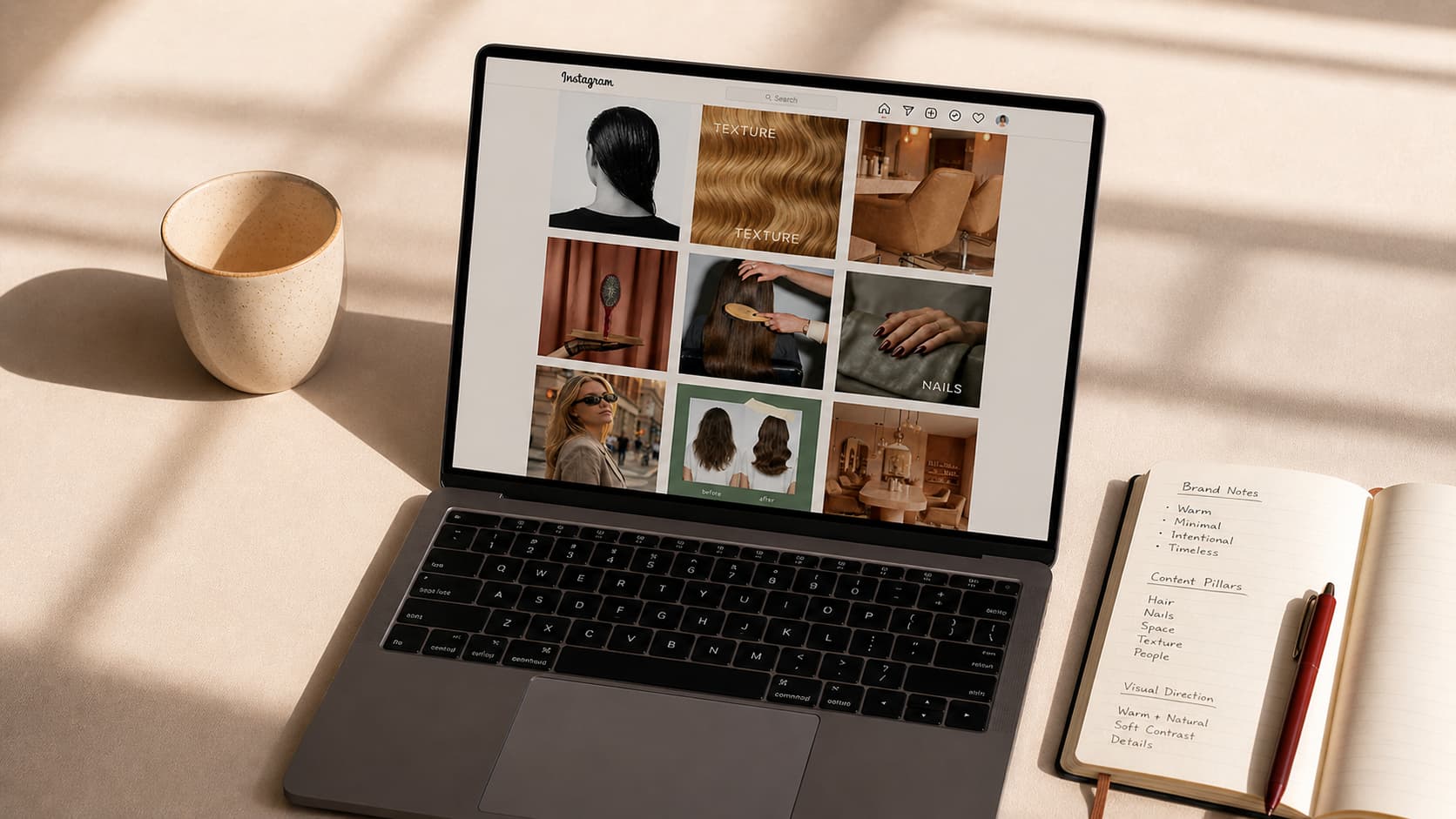
Open Claude and create a new project. The brief needs to answer four questions with genuine specificity. Who is the brand and what does it do? Who is the customer and what does that person care about? What should the content feel like, the mood, the visual tone, the emotional register? And what should the content absolutely not look like, the aesthetics to avoid, the clichés of the category that feel overused or off-brand? The depth of this brief is what determines the quality of everything that follows. A brief that says "beauty salon, warm tones, premium" produces generic output. A brief that says "independent hair salon, clients are women in their 30s and 40s who want precision over trends, the aesthetic is quiet luxury, warm neutrals, editorial texture shots, never loud colour or youth-focused energy" produces content that is specifically that salon and no other. Take the time to write it properly. The AI responds to what it is given, and this is where the quality is set.
What Claude Does With the Brief
Once the brief is in place, Claude becomes the strategic layer of the system. It can recommend the shot types that will perform best for this specific brand and audience, suggest a content structure for the month that alternates between different visual themes to create variety without losing coherence, and help write the prompts that will be used in the image generation step. The brief is not a one-off document. It lives in the Claude project and informs every piece of content produced going forward, making the system more precise with each use. This approach to using AI as a strategic thinking partner rather than just a generation tool is one of the core skills covered in depth for anyone building a serious AI practice.
Step 2: Generate Your Images for Free
With the brand brief and the prompt set built in Step 1, image generation is the execution layer. Three platforms offer free daily image generation that, when used strategically across two to three days, produce enough visual material for a full month of content without spending anything.
The Free Generation Stack
ChatGPT offers approximately three free image generations per day on its standard plan. Gemini offers approximately ten per day. Grok offers approximately ten per day. Spread across two to three days, that is roughly 20 to 25 images generated at zero cost. Not all of them will be usable. That is expected and accounted for in the system. The goal at this stage is volume and variety, producing enough raw material that the curation step in Step 3 has genuinely strong options to work with. The prompts written in Step 1 are what make this generation step produce brand-specific results rather than generic AI imagery. Each prompt should reference the specific aesthetic, lighting style, colour palette, and subject matter defined in the brief. A beauty salon brief produces hair texture close-ups, product detail shots, interior atmosphere images, and lifestyle moments that reflect the specific feel of that salon, not generic salon imagery that could belong to any competitor.
How to Use the Daily Limits Efficiently
Because each platform has a daily limit, the most efficient approach is to batch the prompts by visual theme across the three days. Day one might focus on texture and product detail shots. Day two on lifestyle and atmosphere images. Day three on any gaps identified after reviewing the first two days of output. This batching approach means each day of generation is focused rather than scattered, and the review at the end of each day informs what to generate next rather than producing a random mix of unrelated images.
Step 3: Choose What Is Worth Animating
Not every image generated in Step 2 deserves to be animated. Animation adds time, cost, and production value to a visual. That investment should go toward the images that will benefit most from motion, not toward every image in the library.
The ASMR Test
The curation criterion at this step is what might be called the ASMR test: does this image have elements that the eye wants to linger on? Texture, depth, slow movement potential, surfaces that suggest sensation. Hair catching light. A product sitting on a warm surface. Steam rising from a cup. Water moving. Fabric shifting. These are the images that become genuinely compelling when animated because the motion adds something the still image only implied. From the 20 or so images generated, the goal is to select 8 to 10 that pass this test. The remainder either stay as still images for feed posts or are discarded. The distinction matters because animated content performs differently from static content on most platforms, and mixing both intentionally produces a feed that has visual rhythm rather than feeling uniformly flat or uniformly kinetic.
What to Do With the Still Images
The images that do not get animated are not wasted. They form the static layer of the content calendar, suitable for feed posts, story cards, and carousel content where motion is not required. A month of content typically uses both animated clips and still images, and having a clear library of each makes the scheduling and posting process straightforward rather than improvised.
Step 4: Animate With One Subscription
The final step is where the nine dollars is spent. The images selected in Step 3 are uploaded into an animation tool that generates short video clips from still images. The two tools that work best for this type of content are Higgsfield and Kling, both of which have entry pricing that makes the system genuinely affordable.
Higgsfield and Kling
Higgsfield starts from nine dollars per month at its entry tier. Kling starts from six to ten dollars per month depending on the plan. Both tools take a still image and generate a short animated clip of a few seconds, adding subtle or more pronounced motion depending on the prompt instructions given. For content in beauty, wellness, food, and lifestyle categories, the output from both tools is strong enough to use directly on Instagram and TikTok without additional editing. The workflow is straightforward. Upload the selected images one by one, write a brief motion prompt for each describing how you want the image to move, and download the resulting clips. For 8 to 10 images, this process takes one to two hours. The output is 8 to 10 short animated video clips that serve as the primary content for the month.
What Nine Dollars Actually Buys
At the entry tier of either tool, the monthly allowance covers significantly more than 8 to 10 clips. This means the subscription is not exhausted by a single month of content for one brand. For a small business owner managing their own socials, it covers multiple months of content. For anyone offering this as a service to clients, a single subscription covers the animation needs of multiple client projects simultaneously, which makes the unit economics of the service extremely favourable.
What a Month of Content Actually Looks Like
A month of content produced through this system typically consists of 8 to 10 animated video clips and 10 to 12 still images, giving a total of 18 to 22 pieces of content. For a business posting five times per week, that covers a full month. For a business posting three times per week, it provides comfortable coverage with some surplus for the following month.
The Visual Mix
The strongest monthly content grids produced through this system alternate between different visual types in a deliberate sequence. Texture and detail shots create sensory engagement. Lifestyle and atmosphere images create emotional context. Product or service shots create commercial relevance. Mixing these three types across the month produces a feed that feels varied and considered rather than repetitive or random. The content calendar built in Step 1 with Claude is what provides this structure, ensuring the mix is intentional from the start rather than assembled retrospectively.
The Cost Breakdown
Image generation across ChatGPT, Gemini, and Grok: zero. Claude for strategy and prompt writing: zero at the free tier, which is sufficient for this workflow. Animation subscription at the entry tier: nine dollars. Total monthly spend: nine dollars. The output at that cost is a full month of editorial-quality animated and static content that would cost several hundred dollars to produce through a freelance content creator and several thousand through a traditional agency.
Final Thoughts
The small businesses that look like they have a content team behind them in 2026 are increasingly the ones that have built a system rather than hired a person. This system does not require design skills, photography, or a significant budget. It requires clarity about what the brand is, discipline in following a four-step process, and a willingness to invest one weekend setting it up for the first time. After the first month, the brief is built, the prompt library exists, and the workflow is familiar. Each subsequent month takes a fraction of the time. The nine-dollar subscription renews automatically. The free generation limits reset daily. The system runs as long as the brand needs content, which is indefinitely. If you want to go deeper on the strategy layer of AI content creation, learn how to turn this system into a service you offer to other businesses, or build the skills that sit behind this kind of work, AK Academy is where that happens.
Start building professional AI skills today.
Explore AK Academy and choose the path that fits your goal: courses, workshops, community, corporate training, or teaching with us.
FAQ